



The goal for designing web content is to mix your narrative, images, links, and media into something compelling. Sometimes that means trying out different looks. This is why I like ProcessWire. It's so flexible.
Copy from Page to Page
We'll start by copying a display from another page. If you have already designed a feature – and want to duplicate it, you can either clone it within the page, or – if you want to move it to a new page, start by copying it.
https://youtu.be/RTVbkYb52po (404)
Next, we'll create a new landing page – and choose the template that's hidden from navigation. This way we can work on the page, send a link for review, and when we are ready to go live? Switch to the public template. Once we have the page created we just hit the paste button – and publish the page.
https://youtu.be/LXKNeYR8dpM (404)
Adjust everything...
Every content display comes with a variety of adjustable elements – padding, photo placement, background and text colors, additional buttons, overall width... So making adjustments is a snap.
https://youtu.be/Ds8309ZBzmw (404)
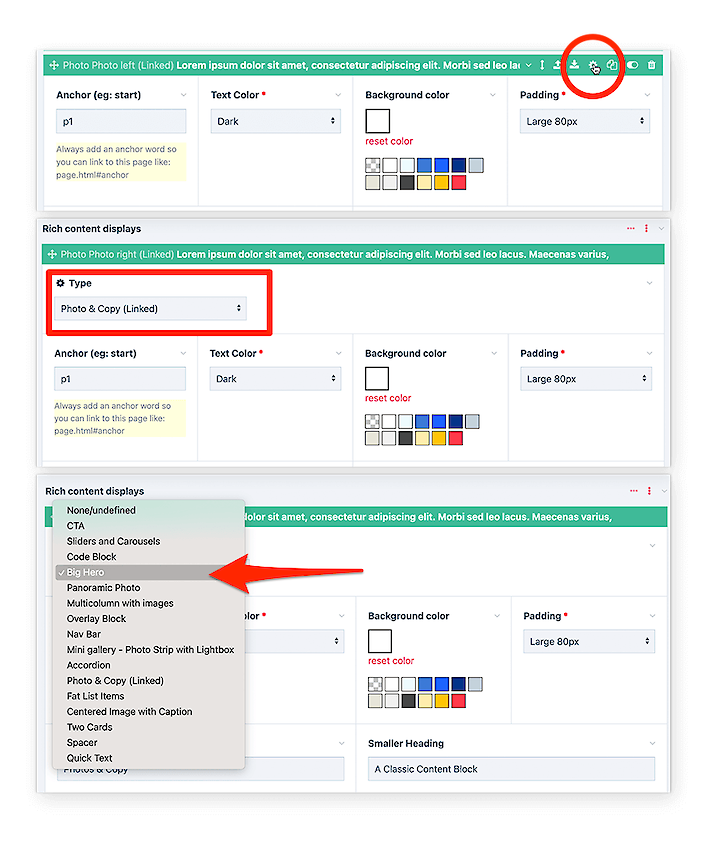
Change designs completely
But what if you're just not happy with that display? What if you change your mind? To switch between displays in a set, click the gear icon, choose a new design, and save the page.